How to Fill Out the ZA Z83 Form Online (Step-by-Step Guide)
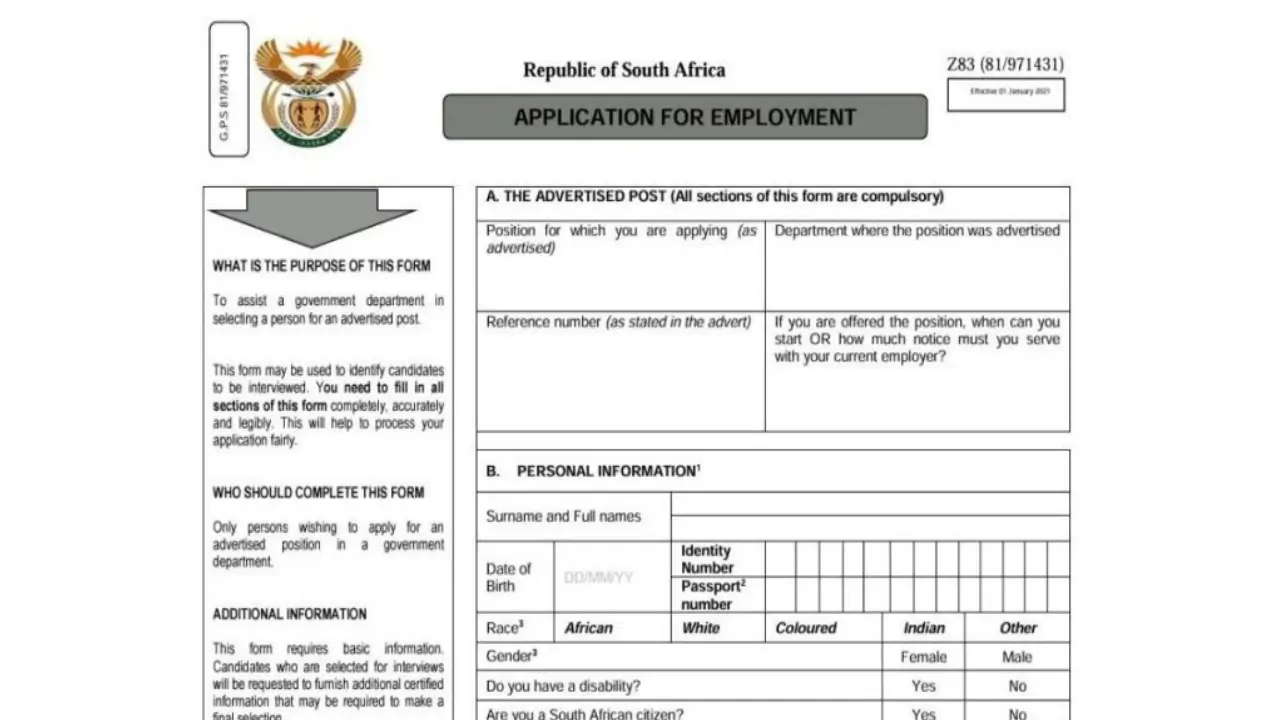
The ZA Z83 form is a mandatory application form for all South African government jobs. Completing it correctly is essential, as errors or missing information can lead to disqualification. This guide explains how to fill out the Z83 form online clearly and accurately, even if it’s your first time applying.
What Is the ZA Z83 Form?
The ZA Z83 is an official government application form required when applying for positions in:
-
National departments
-
Provincial departments
-
Municipal entities
-
Public service institutions
Every advertised government post requires a completed and signed Z83 form, together with your CV and supporting documents.
Step-by-Step Guide to Filling Out the ZA Z83 Online
Step 1: Access the Z83 Form Online
-
Click the “Get Form” button on the website where the vacancy is advertised, or download the latest Z83 form from the DPSA website.
-
Open the form using an online PDF editor or a compatible application.
✅ Always use the latest Z83 form. Old versions may be rejected.
Step 2: Complete the Advertised Post Section
Fill in the following details exactly as shown in the job advertisement:
-
Position title
-
Department
-
Reference number
Accuracy is very important here. Any mismatch may result in disqualification.
Step 3: Indicate Availability or Notice Period
-
State the date you can start work if appointed
-
OR indicate your notice period if currently employed
Be honest and realistic.
Step 4: Complete Personal Information
Fill in all mandatory personal details:
-
Surname
-
Full names
-
Date of birth
-
South African ID number
-
Passport number (if applicable)
-
Race (for employment equity purposes)
Ensure all details match your ID document.
Step 5: Gender, Disability, and Citizenship
-
Indicate your gender
-
Declare whether you have a disability
-
Answer questions about citizenship and work permits truthfully
This information is used strictly for compliance and employment equity reporting.
Step 6: Criminal Record and Public Service History
Answer the questions relating to:
-
Criminal history
-
Previous dismissal from public service
-
Current or previous public service employment
If you answer “Yes”, provide full details where required.
❗ Non-disclosure or false information can lead to automatic disqualification.
Step 7: Contact Details and Language Preference
Provide:
-
Current physical address
-
Phone number(s)
-
Email address
-
Preferred method of communication
-
Preferred language for correspondence
Make sure your contact details are correct and active.
Step 8: List Your Formal Qualifications
For each qualification, include:
-
Name of the institution
-
Qualification obtained
-
Year completed
Only list completed qualifications. Incomplete studies should not be included unless specifically requested.
Step 9: Capture Your Work Experience
Provide details of your employment history:
-
Employer name
-
Job title
-
Start and end dates
-
Reason for leaving
Attach a detailed and updated CV if required by the advert.
Step 10: Provide References
List at least two to three references, including:
-
Full names
-
Relationship to you (e.g. supervisor, manager)
-
Contact numbers (available during office hours)
Always inform your references before submitting the form.
Step 11: Declaration, Signature, and Date
-
Carefully read the declaration section
-
Confirm that all information is true and complete
-
Sign and date the form
✍️ Unsigned Z83 forms are invalid and will be rejected.
Step 12: Save and Submit the Form
After completing the form:
-
Save the document
-
Download or print it if required
-
Upload it to the e-Recruitment portal or submit it as instructed in the job advert
Important Tips for Success
-
Use black ink if printing
-
Ensure handwriting is clear and legible
-
Do not leave mandatory fields blank
-
Attach all required documents
-
Follow the application instructions exactly as advertised
Final Reminder
The Z83 form is not just a formality—it is a legal declaration. Take your time, double-check your information, and ensure everything is accurate before submitting.
Start filling out your ZA Z83 form online today and take the first step toward securing a government job in South Africa.
Download Z83 Application PDF Form Here